Hook: the agency can only staff an accurate, approved request. Production variability is upstream context. The screenshot is the redesigned prototype with sample data, not a measured outcome.
Why I designed and built ShiftForge
My role
Earlier domain work
2years
designing in this problem space
Researching and improving labor planning, shift operations and time records.
ShiftForge
3months
Independent product design and build
Workflows, recommendations, approval controls and the interface.
Patrick observed the work across departments, operators, agency managers, and directors. He redesigned earlier planning, allocation, time, and HR flows. The independent AI-native product and build are his. Three-month duration retained from the existing opening draft.
Staffing for contract manufacturing
Industry context
Contract manufacturers
Manufacturers make products for other brands.
Staffing agency
Agencies supply workers as production needs change.
Keep this to a brief definition before explaining responsibilities. Brands place orders with a manufacturer; the manufacturer uses staffing agencies for temporary labor. Orient the audience to the relationship before moving to shared responsibilities. This illustrative factory photograph does not depict a ShiftForge customer, research participant, or verified temporary worker. Photo: Homa Appliances, Unsplash, _XDK4naBbgw, free under the Unsplash License.
Temp staffing is like catering an event.
Adjust for scale and it's better to have too much than too little.
Use this analogy to explain why staffing plans need room to adjust as production demand changes.
Staffing at a high level
Shared workflow
ManufacturerAgency
1. Plan
Estimate labor needs by department.
2. Staff
Accept labor request and allocate workers.
3. Run shift
Respond to absences and assign surplus workers.
4. Verify time
Resolve missing or inconsistent records.
5. Invoice
Review labor costs and approve payment.
Use the sequence to orient the audience. The product starts with labor demand and carries records forward. It does not configure production lines.
Where staffing slows down
Operational friction
ManufacturerAgency
1. Plan
Estimate labor needs by department.
Plans diverge as demand changes.
2. Staff
Accept labor request and allocate workers.
Eligibility spans several sources.
3. Run shift
Respond to absences, changes and overtime risk.
Coverage decisions delayed without attendance status.
4. Verify time
Resolve missing or inconsistent records.
Supervisors are hard to reach.
5. Invoice
Review labor costs and approve payment.
Approvals sit in separate inboxes.
This is a qualitative synthesis of Patrick’s cross-organization workflow observations, not a time-and-motion study. Each step requires people to compare records, confirm commitments, or route exceptions across organizational boundaries. Traditional separate staffing, scheduling, time, and billing tools make a current cross-party status difficult to assemble. The examples illustrate why manual action accumulates; do not claim every incumbent lacks each feature or assign measured time costs to these rows.
The cost becomes visible after the shift.
~4 hrs
of a coordinator’s week spent reconciling timesheets
15–30%
of invoices need a rate or overtime correction
3–5 days
to resolve a billing dispute over email
These figures were already in the opening draft and earlier case-study files. Their source records, sample, and dates need confirmation. They describe reported baseline pain, not ShiftForge impact. Remove this slide from interview delivery if the figures cannot be substantiated.
Problem
The processes for setting up plans and allocating workers are still manual, and corrections delay invoicing.
State the problem after the evidence: plan setup and allocation still require manual work, while corrections can hold up invoicing. These are workflow observations, not a measured outcome.
Goal
How can AI be utilized to reduce manual processing and inform the decisions that require human judgement.
Frame the design goal: reduce manual processing while keeping people informed for decisions that require human judgement.
The core workflows
Case focus
01Plans
02Timesheets
03Invoices
Introduce the three core workflows. Start with plan demand, approval and agency allocation.
From demand to a locked plan
Planning
Human actionAI-assisted
1
Draft plan
Manufacturer + AI
2
Approve demand
Manufacturer
3
Recommend workers
AI
4
Assign workers
Agency
5
Publish and lock
Agency
Follow the five-step planning flow from an AI-assisted draft through department approval, AI-assisted matching, agency assignment, and publication with a system lock. The agency publishes; the system locks the week. The full Plan interface comes next, followed by the opening details. The legend marks the primary action at each step; a recommendation is never itself an assignment or approval. Department heads manage their demand; permitted operations roles can manage across departments; agencies alone assign/unassign workers. A changed demand request reopens approval, and workers confirm assignment requests outside this captured state.
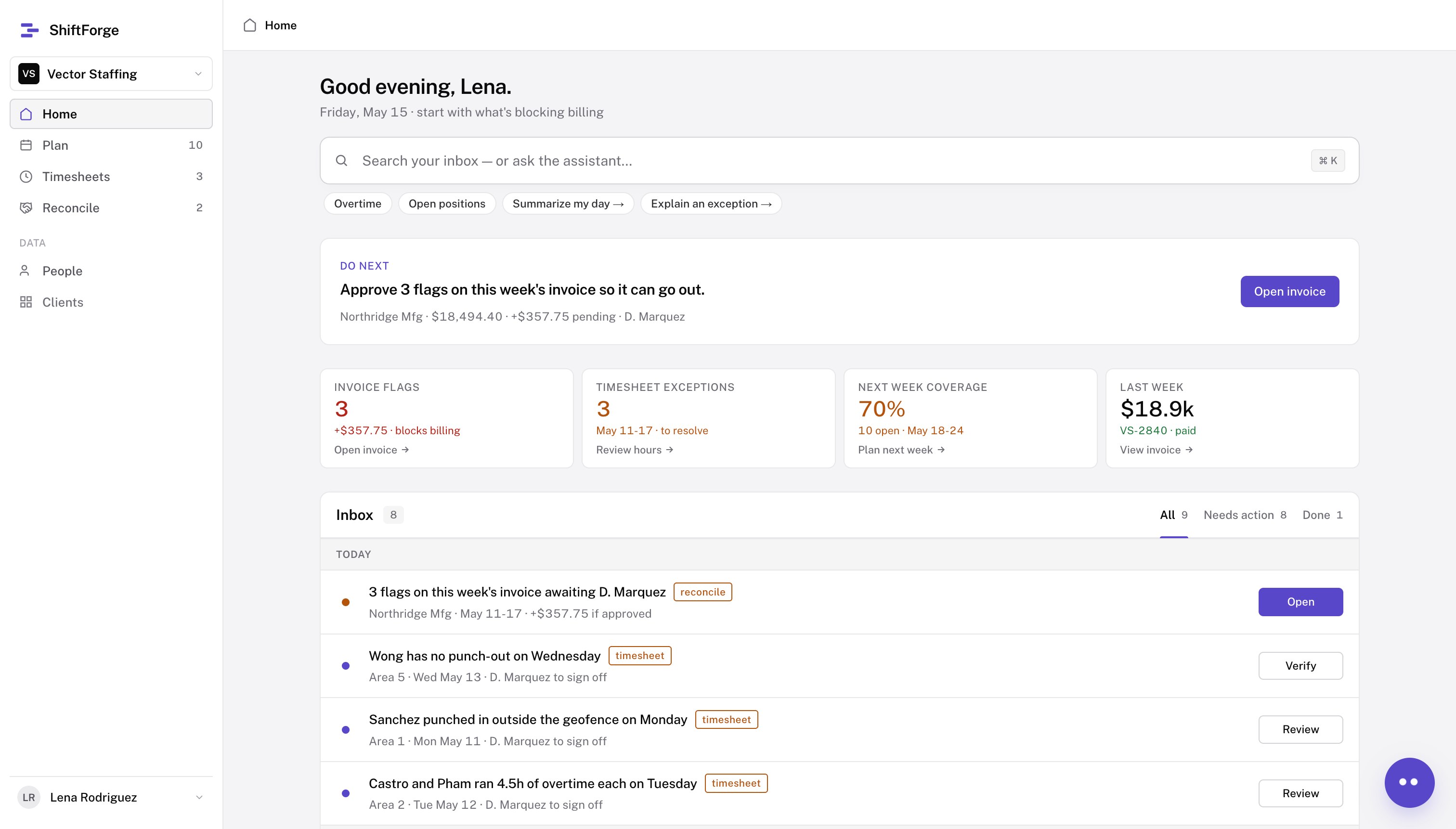
Full-page Plan prototype video showing the next-week schedule, coverage by area, open positions, approvals, and audit metrics. Sample data; this is a captured UI state, not a measured operational outcome.
Draft plans
Planning
1Draft plan2345
Departments own requests
Ownership and accountability ensure accurate requests.
Plan in bulk
Faster processing cuts manual setup for an entire week of shifts.
Approved before fulfillment
Status visibility and prompted reminders prevent delays.
Utilize AI to draft plans
The agent can provide drafts based on user prompts and previous weeks.
The video shows the Add to plan form filling multiple positions across three roles, selected weekdays, and Area 1. The shift requirement belongs to the scheduled opening, but a shift selector is not visible in this crop; do not point to one. Authorized department users manage their own demand; operations permissions may span departments. AI can prepare a draft addition, but the user confirms it, and each department approves its request before agency fulfillment. The visible Add to plan button is a human action, not an approval.
Assistance works across pages
Interaction model
I kept the workspace the focus, with AI assistance visible when needed.
Open on any page to inform or assist with actions.
Why this interface: existing operators navigate datasets, not only conversation. The assistant can open across pages and use the current page, site, and relevant time period as context. This video shows a Plan-page example, not the limit of the interaction. Describe persistent memory as an opportunity if asked; the clip does not demonstrate it.
Agent recommended assignments
Planning
123Recommend workers45
How the AI recommends
A quick reference for eligibility and availability informs the decision.
Assignments are manager-approved
Human judgment prevents bias.
Workers confirm assignments
A response via text or app ensures the worker is available.
Reassignment allows flexibility
Adjustments for changes ensure coverage.
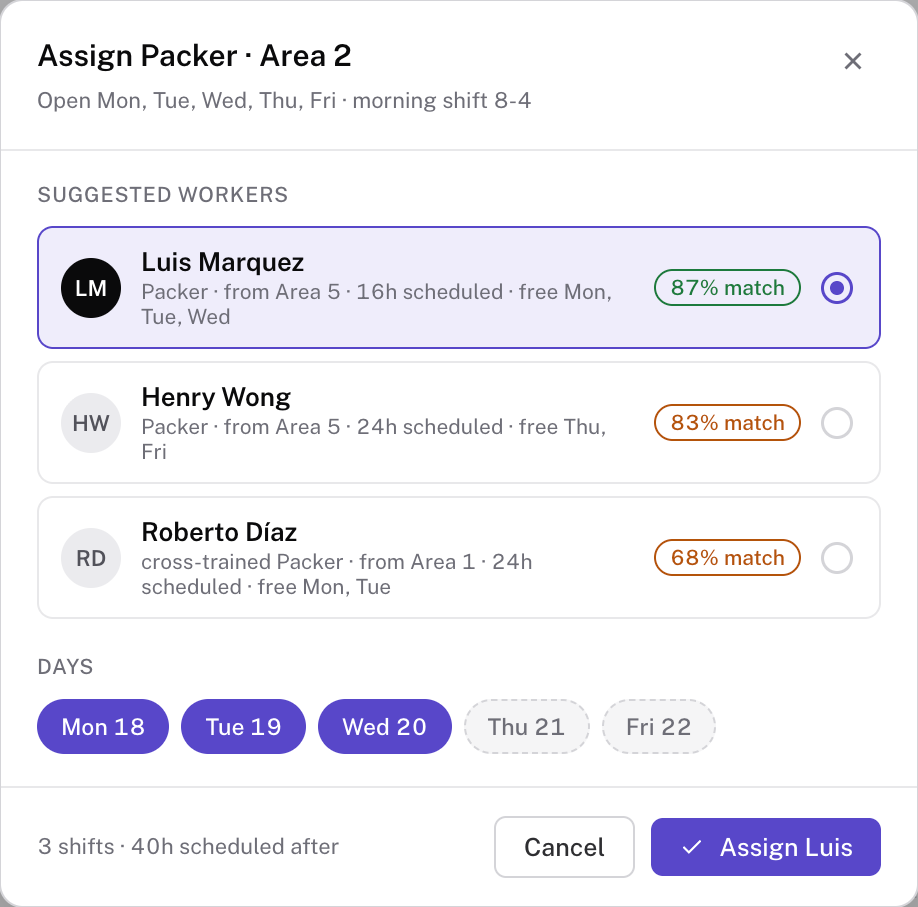
Climax: a recommendation does not equal a confirmed worker. The planner selects a worker and days, a manager approves the assignment, and the worker responds to the request. The modal shows the selection; manager approval and later worker confirmation by text or app are not shown in this capture. Agency users can assign and unassign workers; reassignment remains a human action. Immediate undo and permissioned audit amendments are part of the defined design; avoid implying they are visible in this modal. Video replacement: compare candidates, adjust days, select, undo.
The core workflows
Case focus
01Plans
02Timesheets
03Invoices
Transition from planning and allocation into worked time, exceptions and human review.
Tracking operations
Timesheets
Human actionAI-assistedAutomatic
1
Flag exceptions
2
Propose corrections
AI
3
Resolve and Approve
Manufacturer + agency
4
Submit
Agency
5
Generate Invoice
Trace the five-step timesheets flow. Worker punches enter the record before the sequence shown here. System checks flag exceptions, and the assistant proposes a fix. The combined Resolve and Approve step represents supervisor resolution and manufacturer or agency approval of changes; it does not collapse their separate authority. The agency submits the approved time, then the invoice is generated from that record. The action colors show the primary responsibility. This is a proposed workflow, not measured runtime behavior.
Full-page Timesheets prototype video. The interface shows worker time records, logged hours, overtime, exceptions, and audit information using sample data. Do not present the figures as measured outcomes.
A live-data timesheet
Timesheets
1Flag exceptions2345
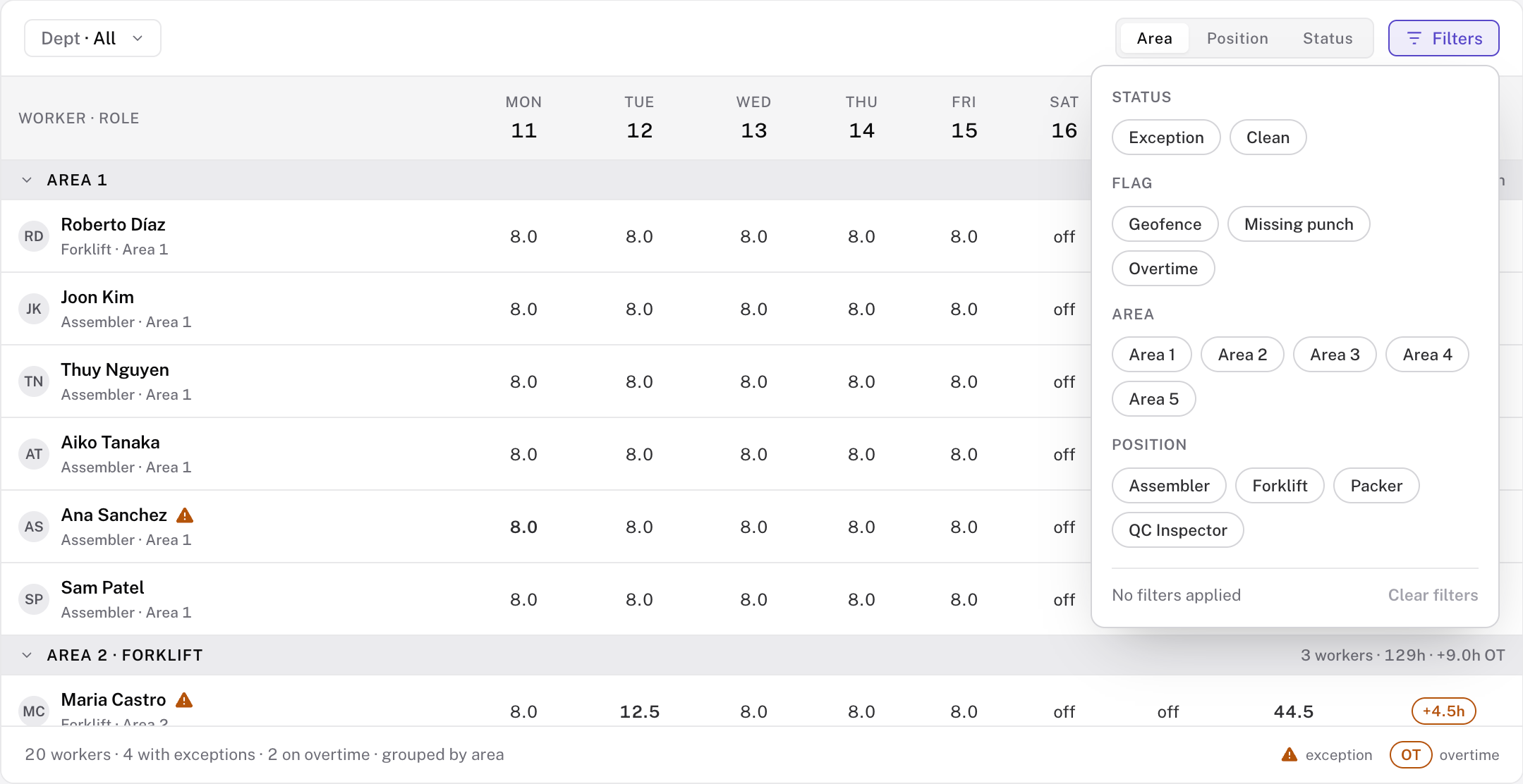
Filters & Sorting
Easily navigate the dataset
Real-time updates
Enables quicker adjustments through visibility
Call to action
Exceptions and OT forecasting enable prompt correction
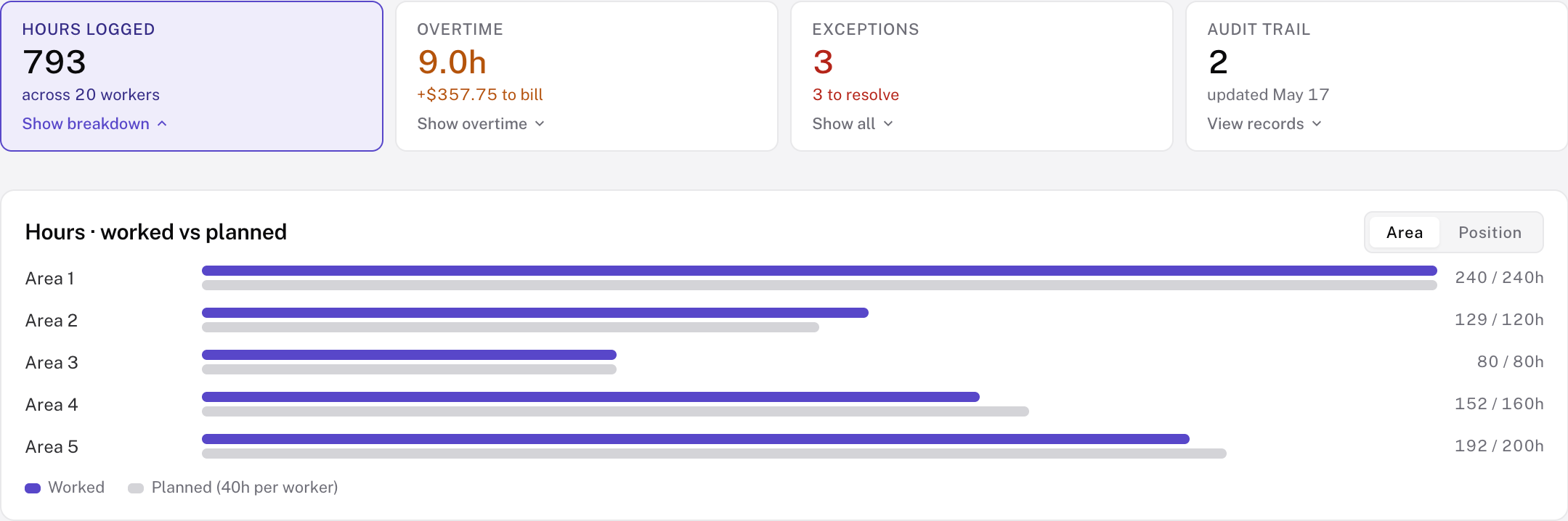
The first captured prototype state opens filters over the worker timesheets table. Switch to the hours dashboard to show worked versus planned hours by area. These are sample end-of-week screenshots, not proof of a live data feed or a validated forecast. In the proposed workflow, hours update as shifts are logged; exception flags and an overtime forecast can prompt review before period close. Distinguish the dashboard’s 9.0 hours of logged overtime from a forward-looking forecast.
Proposed corrections
Timesheets
2Propose corrections
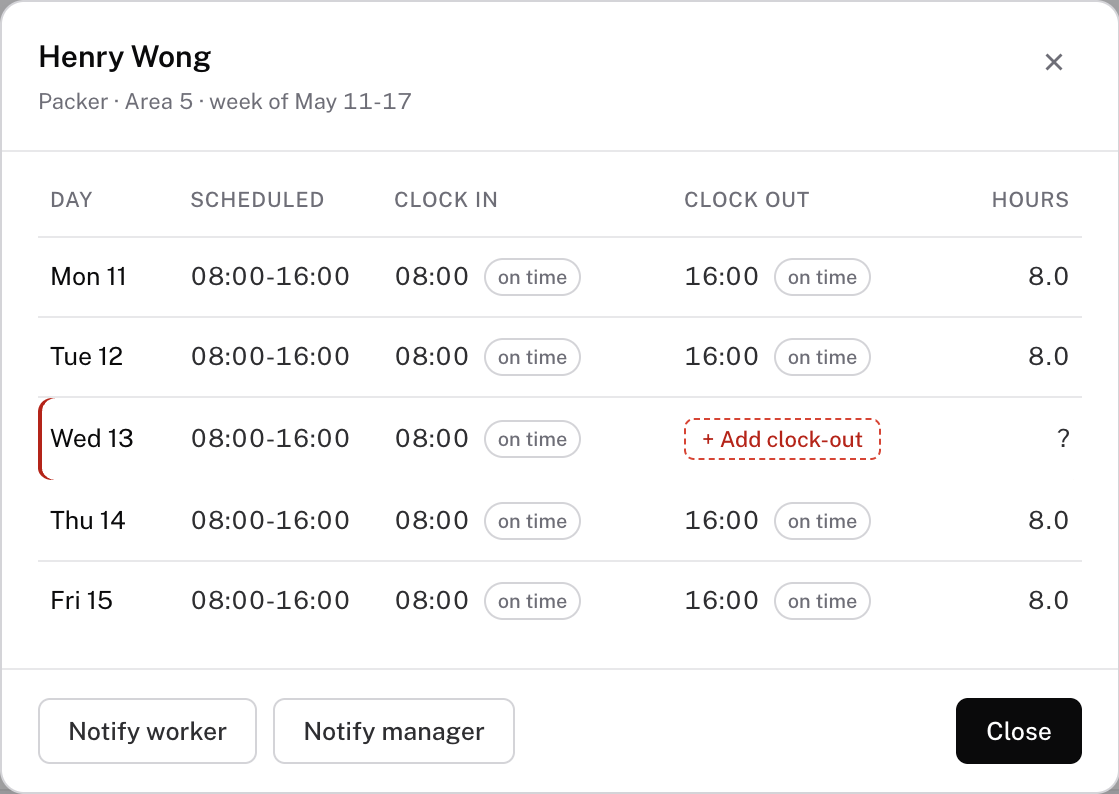
Recorded gap
Clock-in exists; clock-out is missing.
Suggested default
Scheduled end needs confirmation.
Billing hold
Unconfirmed hours stay unbilled.
Human decision
Supervisor rejects, amends, or approves.
Read the difference between recorded 08:00 clock-in and scheduled 16:00 end. The scheduled end is the most likely proposed clock-out, not an observed event. The flag carries event date; Patrick describes age on exception flags. Supervisor confirmation supports the decision. The buttons allow approve, amend, reject. This is a defined default; do not imply an LLM must infer it.
The core workflows
Case focus
01Plans
02Timesheets
03Invoices
Transition from approved time records into invoice reconciliation and the final send decision.
From approved time to a paid invoice
Invoices
Human actionAI-assistedAutomatic
1
Draft invoice
System
2
Flag issues
AI agent
3
Resolve flags
Supervisor
4
Send to AP
Agency
5
Mark paid
Client AP
Trace the five-step reconciliation flow. The system drafts the invoice from approved hours and rates; AI flags issues; a supervisor resolves them; the agency sends the approved invoice to accounts payable; client AP marks it paid. The five stages are a design sequence, not a capture of one completed invoice transaction. A flag is a prompt to review, not a correction or approval.
Invoice flags with human approval
Invoices
2Flag issues
System checks
Flags an overtime exception.
Source records
Provides sources for accountability
AI proposes
Explains the proposed adjustment.
Human decides
Reject, amend, or approve.
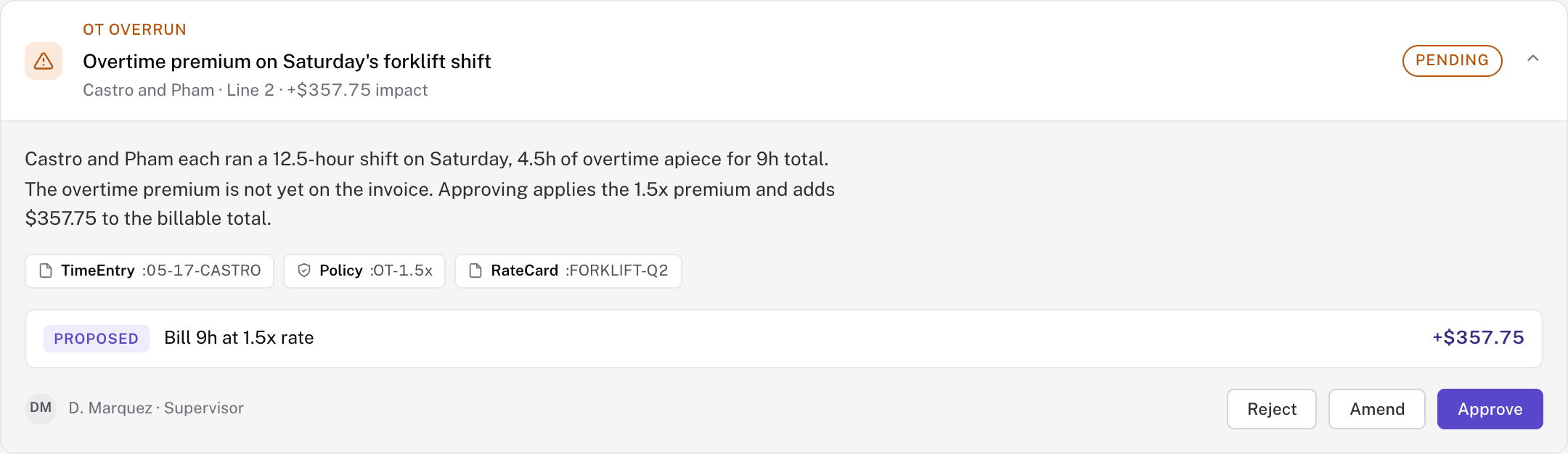
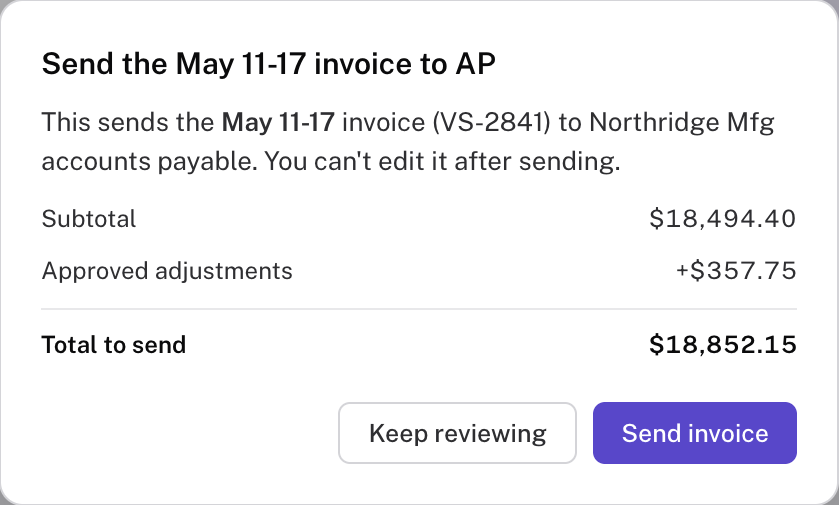
Use the expanded Reconcile flag card as a concrete example of the authority boundary. The orange overtime exception is a system check; TimeEntry, Policy, and RateCard chips cite the source; the proposed adjustment is prepared for review; D. Marquez can reject, amend, or approve. The screenshot is an isolated captured prototype state and should not be described as a continuation of the invoice totals on adjacent slides. Rates are HR-managed by worker/position and overtime rules are organization-defined.
Invoice review stays linked to worked time
Invoices
Inspect the worker’s source record
Confirm the approved amount
Approved changes carry into the invoice. Sending is a separate human action.
The two crops show different captured states. Do not animate them as a single uninterrupted transaction: the screenshots contain unresolved prototype totals. Left supports source inspection; right supports the final commitment gate. No claim that the time correction produced the shown invoice total. The dialog says the invoice cannot be edited after sending. Video replacement: verified source → resolved flags → correct total → send gate.
What the work establishes today
Evidence
Observed
Workflow knowledge
Years of direct exposure and redesign work across planning, allocation and time records.
Designed / demonstrated
Decision flows
A working early demo and redesigned interactions for proposals, approvals and record review.
Still unmeasured
Operational effect
Approval speed, assignment quality, distribution of hours and correction accuracy.
Honest non-result. No new testing or invented failure anecdote. The redesigned screenshots are prototype evidence, separate from the early working demo described in files. Ranking is being tuned. No claim of saved hours, lower overtime, fairness, or adoption.
The next test is decision quality
Next step
Before rollout
Can teams make decisions sooner by staying informed?
Approval lead time
Does an accurate request reach the agency earlier?
Recommendation quality
Do reviewers catch infeasible assignments and incorrect defaults?
Distribution of work
Does ranking overlook qualified workers or concentrate hours?
Close on the unresolved product decision. These are proposed evaluation criteria, not completed research. If the model adds no decision-quality benefit, narrow its role to drafting and explanation. Patrick should supply a personal reflection or real iteration before rehearsing a final script.
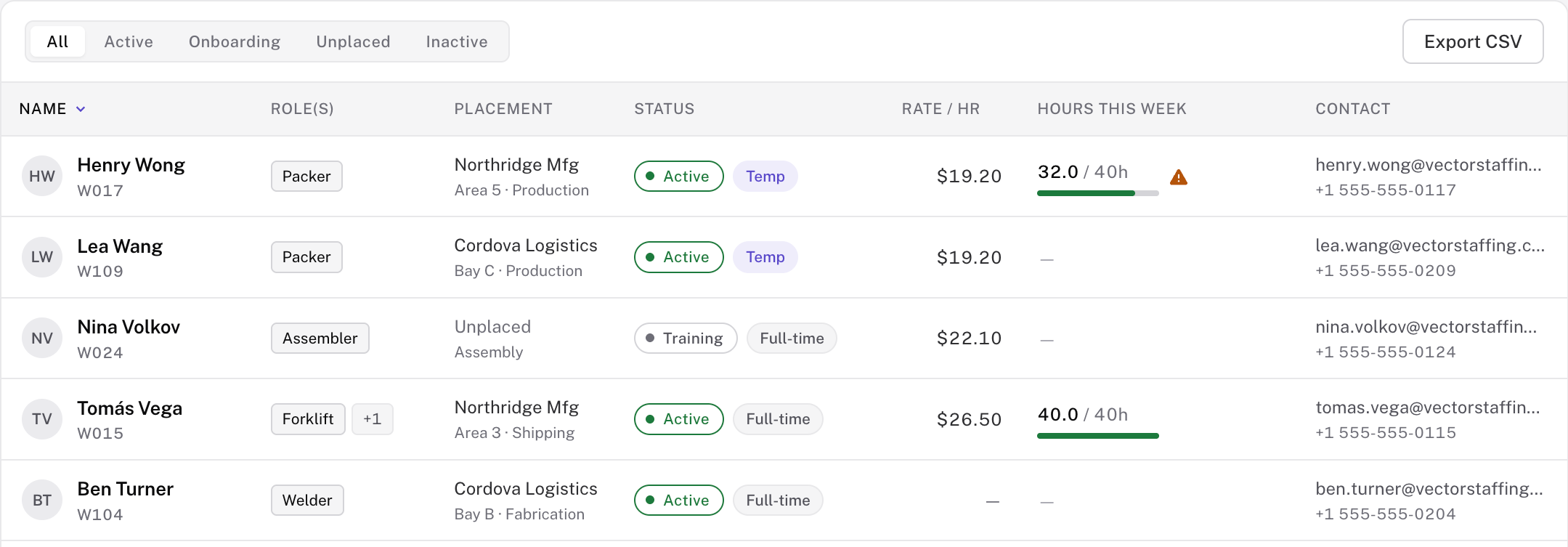
HR records define the eligible workforce
Backup · A1
Status
Rate
Committed hours
Supporting source-of-record view. The capture shows roles/status/rates/hours. Patrick’s HR training-tag rule is described; do not claim a certification detail view is shown. Prototype records use sample data.
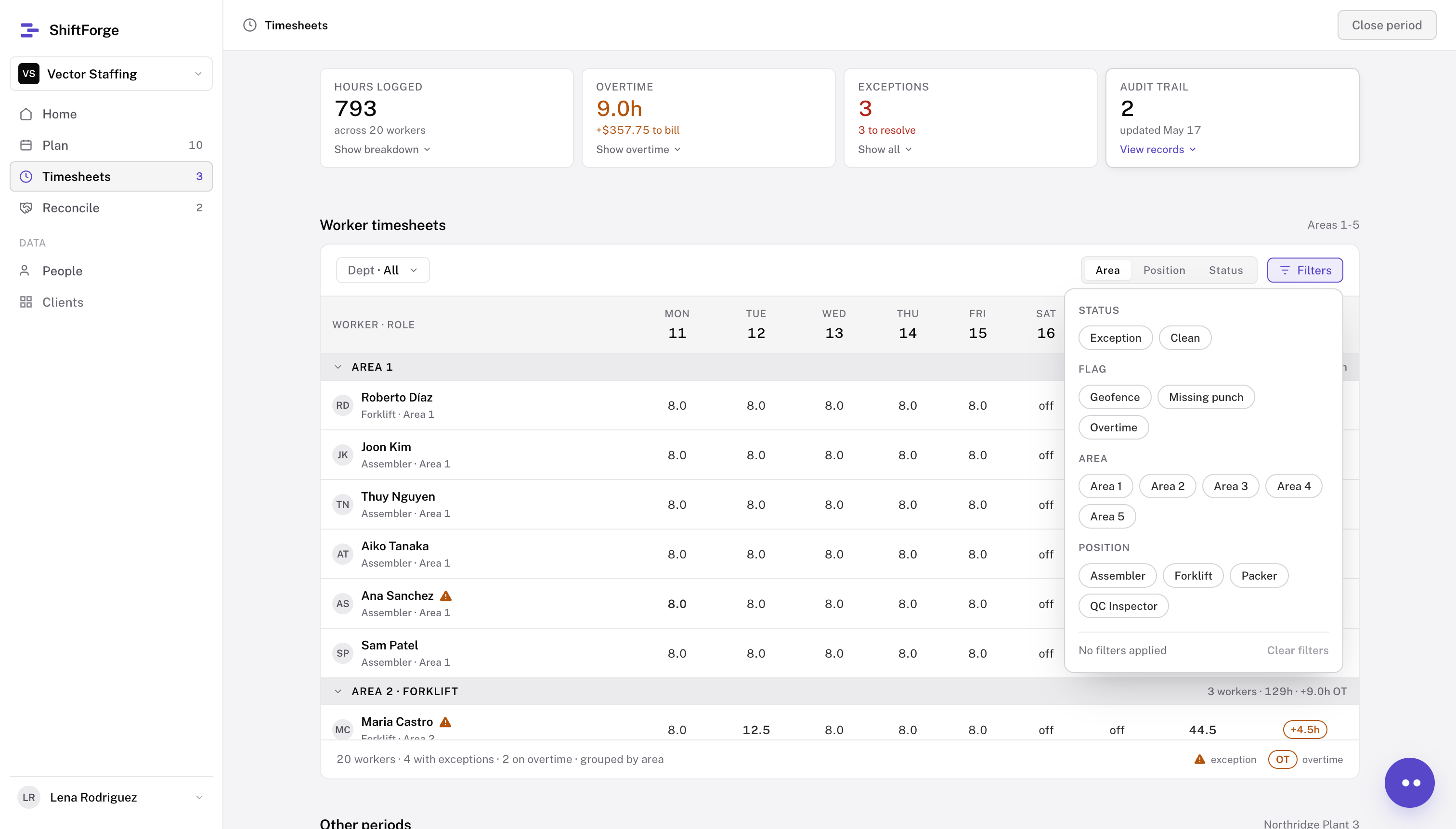
Timesheets
Backup · A2
Full-page Timesheets prototype with no summary metric selected. The worker table is visible and the filters panel is open. Sample data, not a live performance result.
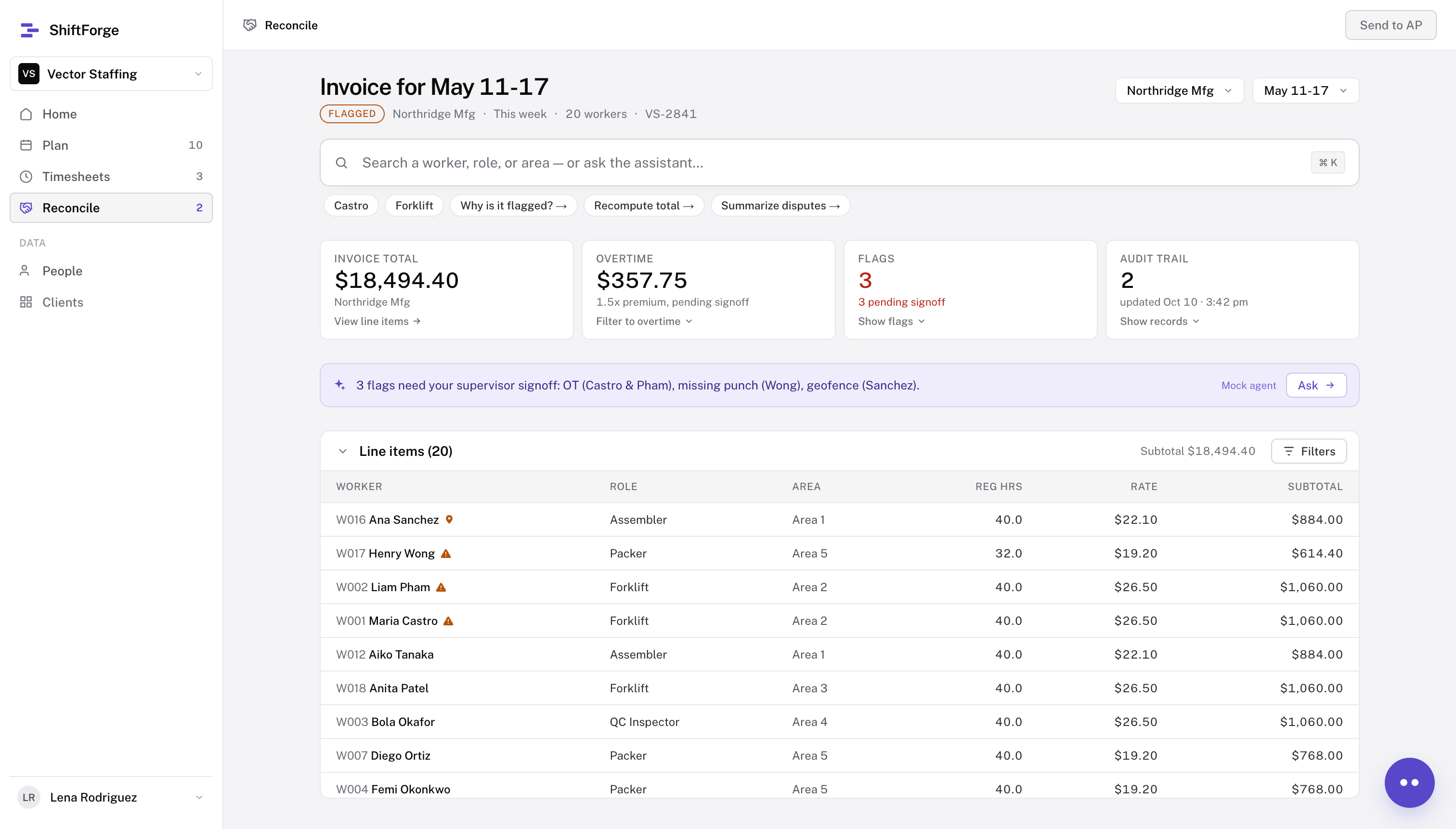
Invoice
Backup · A3
Full-page reconciliation prototype. The invoice is flagged and awaiting supervisor signoff before sending. Sample data; do not present this as an approved or paid invoice.
Competitive analysis
Backup · A4
Not one vendor fit both sides of the problem.
I compared 14 workforce products for factories and staffing agencies. These four vendors show the split; ShiftForge is the proposed middle.
Vendor
Category
Staffing fit
Mfg fit
Hybrid
Bullhorn
Staffing OS
5 / 5
1 / 5
2 / 5
TempWorks
Staffing OS
4 / 5
2 / 5
2 / 5
Shiftboard
Mfg WFM
1 / 5
5 / 5
2 / 5
UKG WFM
Mfg WFM
2 / 5
4 / 5
3 / 5
ShiftForge
Orchestration layer
4 / 5
4 / 5
4 / 5
Gap identified: staffing tools know placements and rates; workforce tools know coverage and hours. Corrections and reconciliation sit between them. This is an internal competitive synthesis across 14 products: sourcing, scheduling, time, approvals, payroll readiness, invoicing, manufacturing fit, staffing OS fit, and agency economics. The four named vendors are representative examples; ShiftForge is the intended design target, not an incumbent measured in the same market scan. Staffing OS strengths: sourcing to invoicing, agency economics and payroll readiness; common gaps: manufacturing fit, UX and implementation. Manufacturing WFM strengths: scheduling, time compliance and labor-cost reporting; gaps: agency economics and staffing-specific invoicing. Recruiting CRM/SMB tools were also reviewed but had less scheduling or back-office depth. Scores on this slide are the presentation synthesis supplied by Patrick; the older archived CSV uses a different scoring scheme.
AI assistance with human authority
Backup · A5
Rules establish
Training eligibility
Position rates and overtime
Approval permissions
AI prepares
Plans from history and a prompt
Assignment recommendations
Exception analysis and proposals
People authorize
Demand and assignments
Overtime and time edits
Invoice approval
Changes to staffing, time and billing require a human decision.
Core product decision: retain deterministic eligibility/rates/RBAC. AI may create reversible plan drafts and propose actions. Avoid calling it wholly read-only; source datasets are read access, while draft creation is a bounded write. Model advantage over rules/templates is not established.



 Draft plans